
Keychron K10 Version 2 Review: One Week With a Keyboard for Work and Play

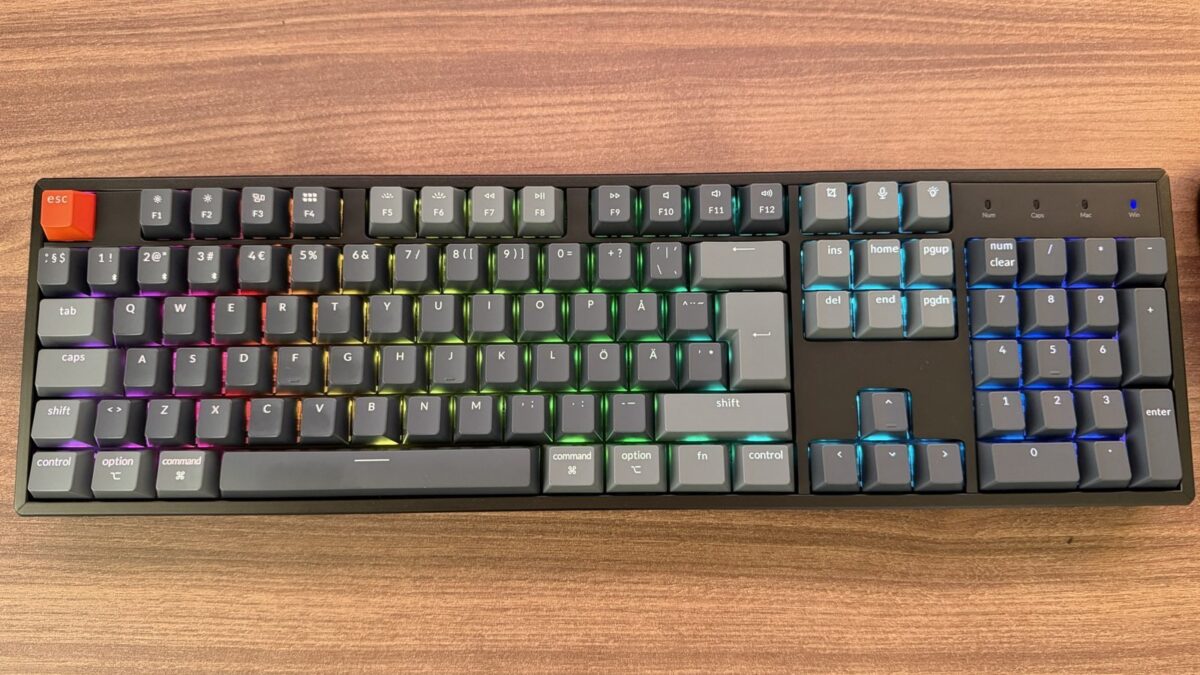
A week ago a box from Keychron landed on our doorstep. Inside was the K10 Version 2, a full-size wireless mechanical keyboard that promises to handle both a Mac and a Windows PC, gaming and office work, cable and Bluetooth.
That is a lot of promises for one keyboard. So rather than rattle off a spec sheet on day one, we did what you would do: we plugged it in, used it for everything for a full week, and paid attention to what we loved and what got on our nerves.
Here is how the first week went.
In this review
One week with the Keychron K10 Version 2 on Mac and Windows, for work and gaming. Verdict: 9/10.

Day one: first impressions
Our review unit is the ISO version with an aluminium frame, RGB backlight, hot-swappable switches and Keychron’s own Super Brown tactile switches. Ours came in a Nordic layout, but the ISO model is also sold in UK, German, Swiss, Spanish and French layouts, and there is an ANSI version for the US.
The first thing we noticed when we lifted it out of the box was the weight. At around 1.16 kg, this is not a flimsy plastic board. The aluminium frame gives it a properly solid feel, and our honest first reaction was simply: this feels like really good quality.

Keychron has also been generous with the extras. In the box you get a braided USB-C to USB-A cable with an angled plug, a set of extra Windows keycaps, a combined keycap and switch puller, a screwdriver and a hex key. The board ships with Mac legends (command and option), so the Windows caps are there if you prefer them. It is the kind of box that tells you the company expects you to tinker.
Keychron K10 Version 2 specifications
| Model | Keychron K10 QMK Wireless (ISO) Version 2, SKU K10X-J3Z-BO (as tested) |
|---|---|
| Layout | Full-size (100%), 105 keys ISO / 104 keys ANSI, 12 multimedia keys |
| Switches | Keychron Super Brown (tactile), factory lubed, 55 gf operating force, 4.0 mm total travel, rated for 50 million keystrokes |
| Hot-swap | Yes, accepts 3-pin and 5-pin MX-style switches |
| Build | ABS case with aluminium frame, aluminium plate, PET, IXPE and EPDM foam |
| Keycaps | Cherry profile, shine-through legends, Mac caps fitted plus extra Windows caps |
| Connectivity | Bluetooth 5.2 (up to 3 devices) and wired USB-C. No 2.4 GHz |
| Polling rate | 1000 Hz (wired) |
| N-key rollover | Yes, wired and wireless |
| Battery | 4000 mAh. Around 190 hours on Bluetooth with backlight off, around 100 hours with RGB at lowest brightness |
| Backlight | RGB, 22 effects |
| Firmware and software | QMK, configured in the Keychron Launcher web app |
| Compatibility | macOS, Windows and Linux |
| Typing angle | 3.5°, 7.7° or 11° |
| Dimensions | 440.2 x 129.2 mm, height with keycaps 31.95 mm (front) / 38.78 mm (back) |
| Weight | Approx. 1,160 g (aluminium frame version) |
| In the box | Keyboard, USB-C to USB-A cable, extra Windows keycaps, keycap and switch puller, screwdriver, hex key |
| Price | US$114.99 (ISO, aluminium frame, hot-swap, RGB) on keychron.com |
Mac work by day, Windows gaming by night

This is the feature that won us over fastest. On the side of the keyboard sit two small physical switches. One flips between Mac and Windows. The other flips between Bluetooth, off and cable.
It sounds almost too simple to matter, but in practice it is the reason this keyboard has stayed on the desk all week. No digging through software, no memorising key combinations. Flick the switch and you are on the other system with the right modifier keys in the right places.
Over Bluetooth it pairs with up to three devices, and you jump between them with Fn plus 1, 2 or 3. A work laptop, a gaming PC and a tablet can all share one keyboard. Plug the cable in and it becomes a wired board with a 1000 Hz polling rate, charging at the same time.
After a week, using one keyboard for two very different computers no longer feels like a compromise. It just feels normal.
Near-silent keys that still feel mechanical

This is the bit that surprised us most. The K10 Version 2 is near-silent, yet every key still feels properly mechanical. You get the satisfying travel and bump of a mechanical switch without the clatter, so you can type away next to someone on a call, or game late at night, without disturbing anyone.
The secret is the combination of Keychron’s Super Brown switches and a lot of foam.
They are tactile, factory lubed and rated for 50 million keystrokes, with an operating force of around 55 grams and 4 mm of total travel. In plain English: every press has a soft little bump that tells your fingers the key has registered, without the loud click of a blue switch.
Keychron has packed several layers of foam into the case, and the result is a soft, muted thock rather than a hollow clatter. Tom’s Guide tested the same Brown switches and also found them office-friendly, which matches our experience.
The full-size layout earned its place too. With a proper number pad, arrow keys and a complete function row, nothing is hidden behind a layer. For spreadsheet work, the number pad alone makes it worth going full-size.
The one thing we would flag after a week of long sessions is the height. With keycaps fitted, the board stands almost 39 mm tall at the back, and there are three angle settings on top of that. A wrist rest makes a real difference.
Evenings: gaming on the K10
When the work was done, the K10 Version 2 became our gaming keyboard, and it was perfectly happy in that role too.
The Browns are light and smooth enough for quick inputs, and over the cable the 1000 Hz polling rate means inputs are as fast as you will ever notice. N-key rollover works in both wired and wireless mode, so frantic key combinations register correctly.
Keychron does not publish a Bluetooth polling rate for this model, but the French site GameWave reported no noticeable lag over Bluetooth in Counter-Strike 2 and ARC Raiders. For competitive play we would still plug in the cable, which is easy since it is right there in the box.
It is rare for a keyboard to feel equally at home in a spreadsheet and in a shooter. This one does.
The lighting
There are 22 RGB effects, cycled with Fn plus Q, and Fn plus Tab switches the backlight on and off. The legends are shine-through, so the light picks out the letters and glows softly between the keys rather than turning the desk into a nightclub.

The look overall is understated: black case, dark grey keys, lighter grey modifiers and a single orange Esc key for a bit of personality. Some reviewers have called it plain. After a week, we would call it grown-up. It looks right next to a work laptop and next to a gaming rig.
A week in: the battery
This is the part that surprised us most. Inside the K10 Version 2 is a 4000 mAh battery, and it lasts an extremely long time. A week in, charging simply has not been something we have had to think about.
On paper, Keychron quotes around 190 hours over Bluetooth with the backlight off, or about 100 hours with the RGB on its lowest setting. To save power, the backlight switches off after 10 minutes of inactivity on Bluetooth, and the keyboard goes into deep sleep after two hours. A key press wakes it back up.
Getting set up
Setting up the K10 Version 2 takes a couple of minutes. Here is what to do:
- Pick your system. Slide the Mac/Windows toggle on the side to match the computer you are using.
- Bluetooth. Slide the connection toggle to BT, then hold Fn + 1 for 4 seconds and pair with “Keychron K10 Version 2” in your computer’s Bluetooth settings. Repeat with Fn + 2 and Fn + 3 for a second and third device.
- Wired. Slide the toggle to the cable position and plug in the USB-C cable. This also charges the battery.
- Customise. With the cable connected, open the Keychron Launcher in Chrome, Edge or Opera to remap keys, record macros, change the lighting and update the firmware.
- If something goes wrong. Hold Fn + J + Z for 4 seconds to factory reset the keyboard.
Keychron’s K10 Version 2 user manual and quick start guide cover every shortcut and setting, and the official product page lists all layouts and versions.
For the tinkerers: QMK and hot-swap
If you like to tinker, there is plenty of room to grow. The hot-swap sockets take almost any 3-pin or 5-pin MX-style switch, and the puller is in the box. If tactile is not your thing, you can turn this into a linear or clicky keyboard in about half an hour.
The K10 Version 2 also runs QMK, the open-source firmware keyboard enthusiasts love. Keychron’s Launcher is a web app, so there is nothing to install: connect the keyboard by cable, open launcher.keychron.com in Chrome, Edge or Opera, and you can remap keys, record macros, change the lighting and update the firmware. There are four layers, two for Mac and two for Windows, so you can build a gaming layer without touching your everyday layout.
What we would change
A week is long enough to find the rough edges, and there are a few:
- No 2.4 GHz wireless. It is Bluetooth or cable. Keychron’s Max series has a dongle; this one does not.
- It is tall. Budget for a wrist rest if you type for hours.
- It is heavy. Great on the desk, less great in a backpack.
- The Launcher needs a cable and a Chromium browser. A small hassle, but worth knowing.
Price
The ISO version we tested is listed at US$114.99 on Keychron’s website. In Europe it has been priced at around €140 to €145, although some ISO layouts sell out quickly. Cheaper versions with a plastic frame or white backlight are also available.
For a full-size, hot-swappable, aluminium-framed wireless keyboard with QMK, that is good value. Plenty of gaming-branded boards cost more and do less.
Our verdict after one week
A week ago the K10 Version 2 was a box on the doorstep. Today it is the keyboard we reach for first, for work and for play.
The build quality is excellent, the Brown switches are a pleasure to type on, switching between Mac and Windows takes one flick, and the battery means we have barely thought about the fact that it is wireless. The lack of 2.4 GHz and the tall profile are the only real compromises.
If you want one full-size mechanical keyboard that is just as good in a spreadsheet as it is in a shooter, the Keychron K10 Version 2 is very easy to recommend.
Final verdict: 9/10



Join the Conversation